Adopt-a-Family Sponsor Guide
Here’s how to purchase items from Amazon Holiday Gift Lists/Registries.
Note: Please do not complete these steps until I’ve emailed you confirmation of your matched caregiver(s). The email will contain their Amazon Holiday Gift List(s). At that point, you can come back to this page to learn how to complete your purchases.
Thank You for Your Generosity
Thank you so much for your generosity and support of this program! I truly appreciate each and every one of you for helping make the holidays brighter for our ChristianaCare caregivers and their families.
Before You Shop
Like the past few years, we’re using Amazon Holiday Gift Lists as an efficient way to match sponsors and families. Each child will have their own gift list.
You’ll need a personal Amazon.com account to purchase and pay for gift list items. If multiple members of your department plan to participate, each person will need to log in with their own Amazon account.
When you click a gift list link, you’ll see the caregiver’s first name, followed by the first name(s) of their child(ren) along with each child’s age, sex, and hobbies/interests.
This information helps:
Protect family privacy while allowing team members to shop easily.
Provide enough context to select thoughtful alternative gifts if certain items are unavailable or outside your budget.
How to buy items that aren’t on the Amazon Gift List
If you want to purchase something extra or alternative from Amazon that isn’t in a gift list, search for it on Amazon like normal. Add it to your cart and go to checkout. If Amazon allows it, you’ll see the family’s “Gift Registry Address” as a shipping option. If that doesn’t appear, no problem, just email me the items (the Amazon links to the items) you’d like to purchase for the parent or child(ren), and I’ll ask the parent to create a new gift list specifically for those items. Once they add them, you can view that new list and purchase everything directly from there.
How to keep your address private
When you purchase through any of the family’s Amazon Gift Lists, Amazon automatically hides your personal address. The recipient never sees who sent the item or where it came from. If Amazon gives you an option to hide your address during checkout, simply select it to keep everything private.
Deadline for purchasing gifts
There’s no specific deadline for purchasing gifts. The general idea is for gifts to arrive to the caregiver no later than 3-5 days before December 25. But if something arrives just before or just after that date, it’s okay. It’s happened before and it’s not a big deal since most of the gifts would likely arrive well before the 25th.
Event Date
I told caregivers to put the event date as 12/12/2025. But if a different date is shown on their gift list(s), it’s not a problem. The event date isn’t really important as this isn’t a “one day event”. Just purchase gifts when you can and if they arrive after December 12, it’s no problem.
Shopping Guidelines
Families are asked not to request expensive items such as computers, phones, tablets, or gaming systems. If one appears on a list, you can decide whether or not to purchase it.
If a list doesn’t include enough affordable items and you’d prefer to purchase something within your budget, please let me know and I’ll ask the family to update their list.
Please don’t feel pressured to purchase every item—only buy what you can comfortably afford.
You’re also welcome to include a few extra items that aren’t on the list if you find something you think the child might enjoy or that’s popular for their age group. However, please prioritize the listed items first.
Parents or guardians may add more items later, so gift lists may change slightly over time.
If an item is sold out, you may send an Amazon eGift Card or Gaming Gift Card (if applicable) instead. If you do, please notify me so I can confirm that the family received it electronically.
Optional Gifts for caregivers
If you’d like to purchase something for the caregiver (parent or guardian), you’re welcome to do so! Just search for an item on Amazon like normal. Add it to your cart and go to checkout. If Amazon allows it, you’ll see the family’s “Gift Registry Address” as a shipping option. If that doesn’t appear, no problem, just email me the items (the Amazon links to the items) you’d like to purchase for the caregiver, and I’ll ask them to create a new gift list specifically for those items. Once they add them, you can view that new list and purchase everything directly from there.
————————
Instructions on Purchasing from a Gift List
(Screenshots are from 2023, but the steps should still be accurate. I will be updating the screenshots to this year’s checkout flow by December 8.)
Reminder: You’ll need a personal Amazon.com account to purchase and pay for gift list items.
If multiple members of your department are sponsoring, each person will need to log in with their own Amazon account to purchase specific items from a gift list.
Step 1: Click the Registry Link
Click the provided registry or gift list link to open the family’s Amazon Holiday Gift List.
Step 2: Sign In to Your Amazon Account
If you aren’t already signed in, Amazon will prompt you to log in before you can add items to your cart.
Step 3: Add Items to Your Cart
Click on any item you’d like to purchase and select “Add to Cart.”
Before checking out, uncheck the box that says “Share your shipping address with the recipient.”
This ensures your personal address remains private.
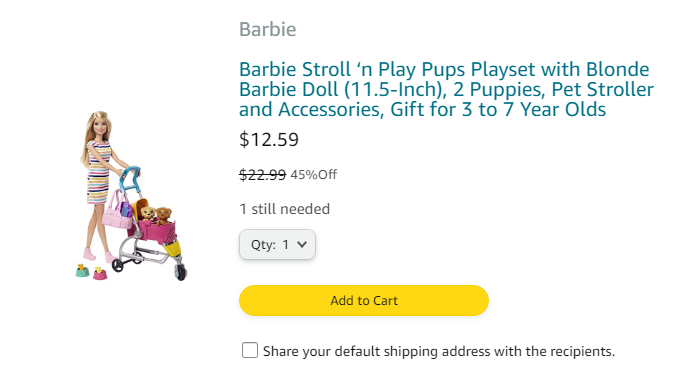
Step 4: When finished, go to your Cart.
Step 5: Check the box labeled “This is a gift”
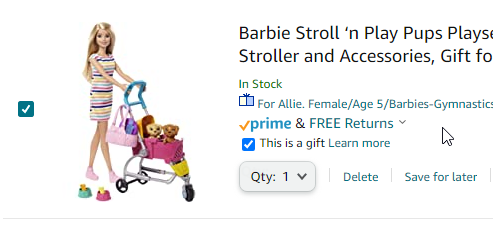
Step 6: Proceed to checkout. When checking out, please ensure the shipping address is set to the parent/guardian’s address. Amazon will display only their city, state, and ZIP code for privacy.
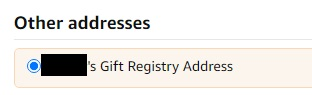
Step 7: Select the recipient’s address as the Shipping Address. This is the address the gift(s) will be sent to. Be sure the Shipping Address does not default back to your address.
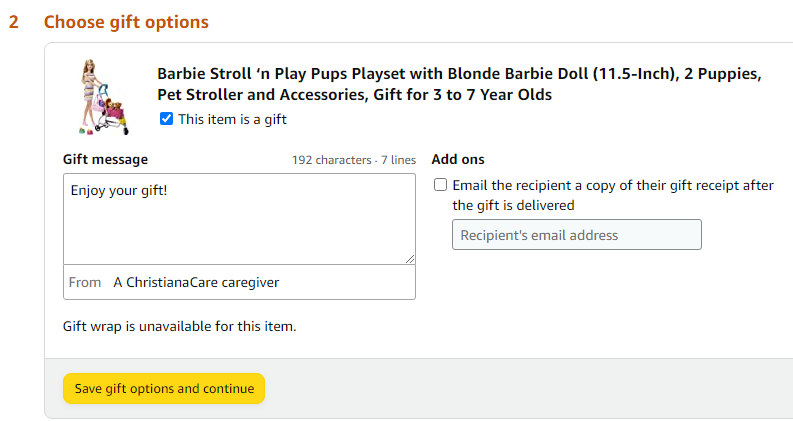
Step 8: Write a message and who it’s from. You can write your name, “A ChristianaCare Caregiver”, “A fellow Caregiver”, “Secret Santa” or anything else you’d like.
You won’t have the caregiver’s email address directly. However, if you’d like them to receive a copy of their gift receipt, you can email it to me, and I’ll make sure it’s forwarded to the caregiver on your behalf. My email address is Manoj.Philip@ChristianaCare.org
Then click Save gift options and continue.
Step 9: Choose a payment method and continue
Step 10: Review items and shipping. Choose a delivery option. Then place your order.
As long as you follow the steps above, your name, shipping address and billing address will not be revealed to the sponsored caregiver(s).
————————
AFTER YOU’RE DONE SHOPPING
Once you or your department have finished purchasing items from a family’s gift list, please notify me via email at Manoj.Philip@ChristianaCare.org.
This simply means you’re done shopping—it doesn’t mean that every item on the list must be purchased.
Please let me know if you have any questions!